For HVAC offices and install crews

Give every HVAC changeout a scope, a schedule, and a labor budget.

A sold system is only the start. Your advisor needs to price the ductwork, your dispatcher needs an install slot, and your crew needs to know what was promised. Menaia keeps that handoff on the job.

No long-term contract · Live and set in a week · 14-day free trial

Uniformed HVAC crew arriving at a home: technicians unloading a condenser unit from the box truck while the lead tech reviews the job on a tablet

Built hands-on with working service businesses.

KAN Builders
Attic Projects — Attic & Crawl Space Experts
Alohomora Locksmith & Garage
Jakobsen Water & Fire Restoration
Sky Clean Air
KAN Builders
Attic Projects — Attic & Crawl Space Experts
Alohomora Locksmith & Garage
Jakobsen Water & Fire Restoration
Sky Clean Air

The equipment price is only part of a changeout.

For a small HVAC shop, the expensive gaps often sit between sales and installation. Use the same job record to check what the advisor included, what dispatch published, and what the crew actually worked.

Ask Meni about the handoff. Example exchange: You: “Draft a follow-up on the unsigned changeout estimate.” Meni: “I have prepared a reply using the estimate for your review.” The quote and customer conversation supply the context; your office approves the message. You can also ask which completed installs ran over their estimated hours.
Equipment scope

The condenser is priced. The ductwork is not.

A single replacement-system figure hides the extra work your installer discovers at the handoff.

The fix

With Menaia, equipment, ductwork and install labor appear as separate catalog lines with their own quantities and costs.

Equipment + labor Review both sides of the changeout See the estimator
Advisor pricing

Last summer's number becomes today's quote.

An advisor copies a familiar ticket without checking the current equipment cost or the labor allowance.

The fix

With Menaia, the calculator uses your catalog and multipliers, so the office can maintain the inputs advisors quote from.

Your catalog A common starting point for advisors See live margin
Install hours

A long install has no useful comparison.

Calling a changeout a one-day job says little when you have not counted the labor across the crew.

The fix

With Menaia, estimated labor hours give you a target to compare with actual crew shifts when the install closes.

Budget vs shifts Count the labor behind the day See time bonuses
Homeowner decision

Two system quotes look interchangeable.

The homeowner sees the final price but cannot tell what equipment and installation work you included.

The fix

With Menaia, a branded proposal carries the scoped items into the customer decision and signature.

Defined replacement Make the included work visible See proposals
Dispatch

A no-cool visit collides with an install.

Service appointments and sold changeouts compete for the same people without a shared view of their time.

The fix

With Menaia, dispatch can check appointments, shifts and time off together before publishing the install schedule.

Person view Check the tech before assigning work See scheduling
Installer pay

A smooth changeout disappears into payroll.

The crew sees the next assignment but cannot trace how saved install hours affected its reward.

The fix

With Menaia, hours saved fund a bonus pool under your branch rules, with each installer's share visible in the Wallet.

Job-linked reward Install efficiency the crew can follow See the Wallet
Completed system

The air is cool. The bill is still a draft.

The office rebuilds the equipment and installation lines after startup because the quote is elsewhere.

The fix

With Menaia, you create the invoice from the estimate and check it against the completed changeout.

Estimate to invoice Carry the priced scope into billing See invoicing
Seasonal review

Busy changeout weeks conceal labor overruns.

A full install board can feel profitable even when crews repeatedly exceed the quoted hours.

The fix

With Menaia, estimated hours, actuals, discounts and payouts stay available for a job-by-job margin review.

Install variance Read the hours behind the sales total See cost tracking

Work through a changeout quote before leaving the home.

Consider a replacement system with a ductwork adjustment. The advisor first records the property and agreed scope, then selects the equipment, duct materials and labor from your catalog. The software prices those inputs; your advisor remains responsible for selecting the right system and work.

  • Start with the replacement equipment your advisor specified. Enter its quantity and review the stored cost rather than copying a previous homeowner's total.
  • Add the ductwork adjustment and its labor as scoped items. An equipment-only quote and a quote with duct changes should show different work.
  • Review the calculator breakdown: materials, labor, retail, discount, tax and final price. Resolve a missing allowance before sending the proposal.
  • Use the resulting labor budget in the install handoff. The price book and calculator are available on Core and above.
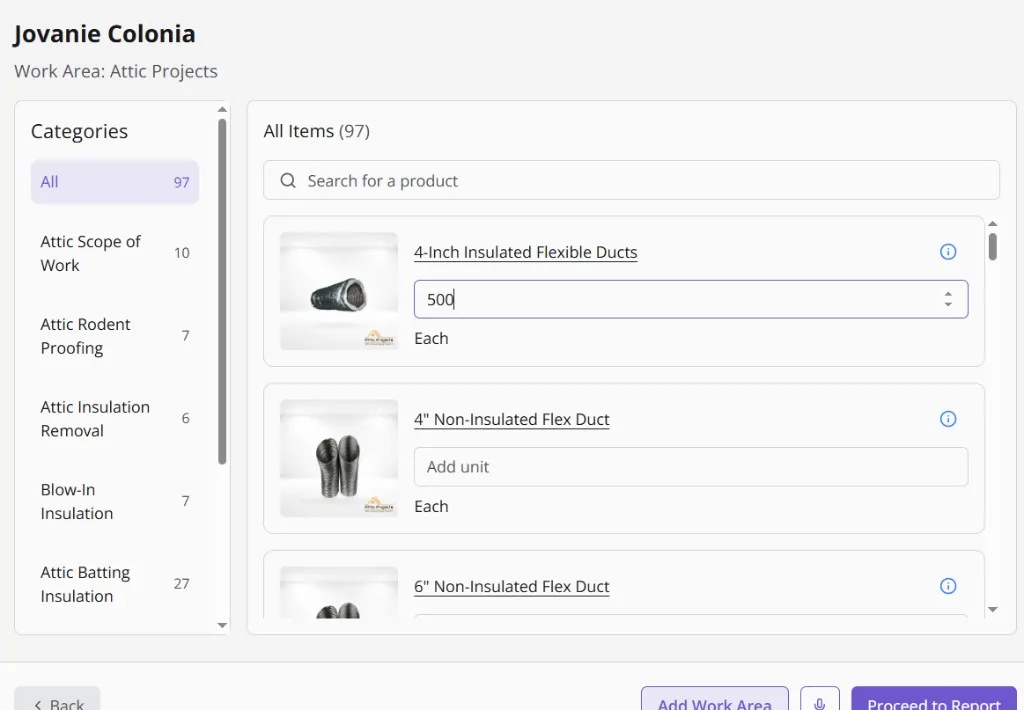
The Menaia estimate calculator for a client: 97 catalog items across categories like attic rodent proofing and blow-in insulation, with a quantity entered on insulated flex duct
Meni is building the estimate
From the price book, on a real job
  • Pulled the price book97 items with your real labor and material costLoaded
  • Priced the linesQuantities in, margin computed per lineMargin visible
  • Drafted the proposalE-signature and the client portal link attachedReady

Keep the service call and the install slot in view.

A no-cool call arrives while a changeout is ready to schedule. Dispatch checks the available techs in person view, keeps the service appointment beside the install shifts, and publishes the assignments once the plan works. Assigned people receive the update.

  • Use job view to check who is assigned to the changeout; use person view to spot the technician already covering a service visit.
  • Pass the sold scope into the work order so the installer can read the ductwork allowance before arrival.
  • Keep before photos and startup records in named project folders, where the office can find them when billing.
  • Compare clocked shifts with the installation allowance after completion, then review the next similar quote.
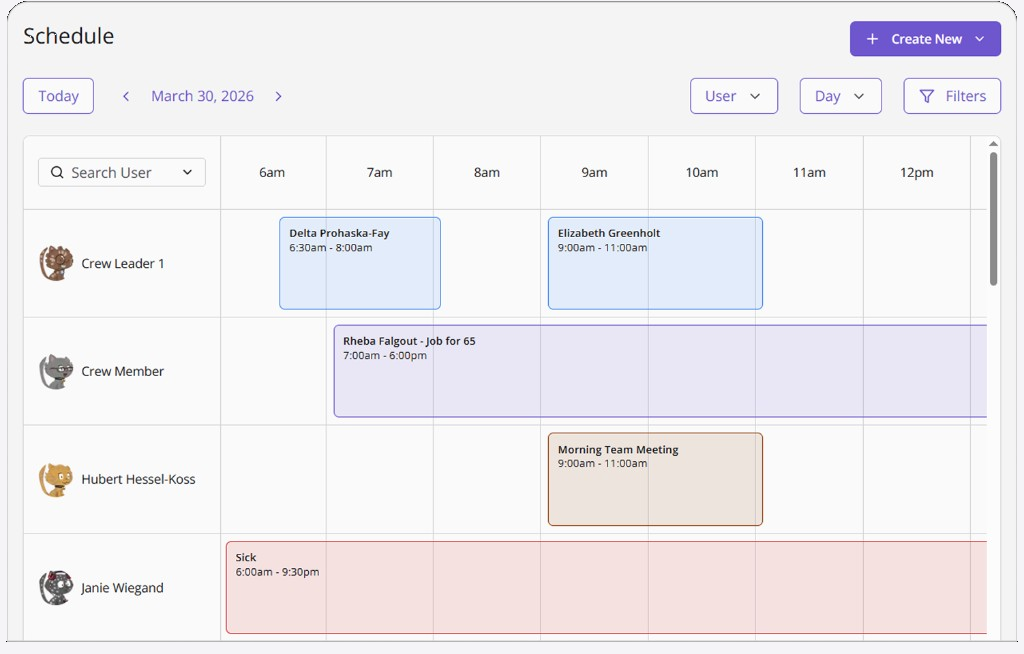
The Menaia schedule in day view: a crew member on Job for 65 from 7:00am to 6:00pm, a morning team meeting, and a sick day, all on one board.
Meni is filling the board
From sold estimate to crew phones
  • Held Thursday 9:00 AMAssessment created from the sold estimateHeld
  • Published the shiftThe crew sees it on their phonesPublished
  • Sent the on-my-way textFrom the schedule, when the tech rollsSent

Show installers where the bonus came from.

The changeout budget should cover the work you sold, including startup. When actual crew hours finish below that estimate, Menaia applies your branch base rate and pool percentage, then allocates the pool by hours worked.

  • Discuss the scoped install hours before the shift so the target has a clear meaning for the crew.
  • An installer's Wallet entry points back to the job; a saved hour has a visible connection to pay.
  • Use the performance board to review completed work and coach on overruns alongside the bonus outcome.
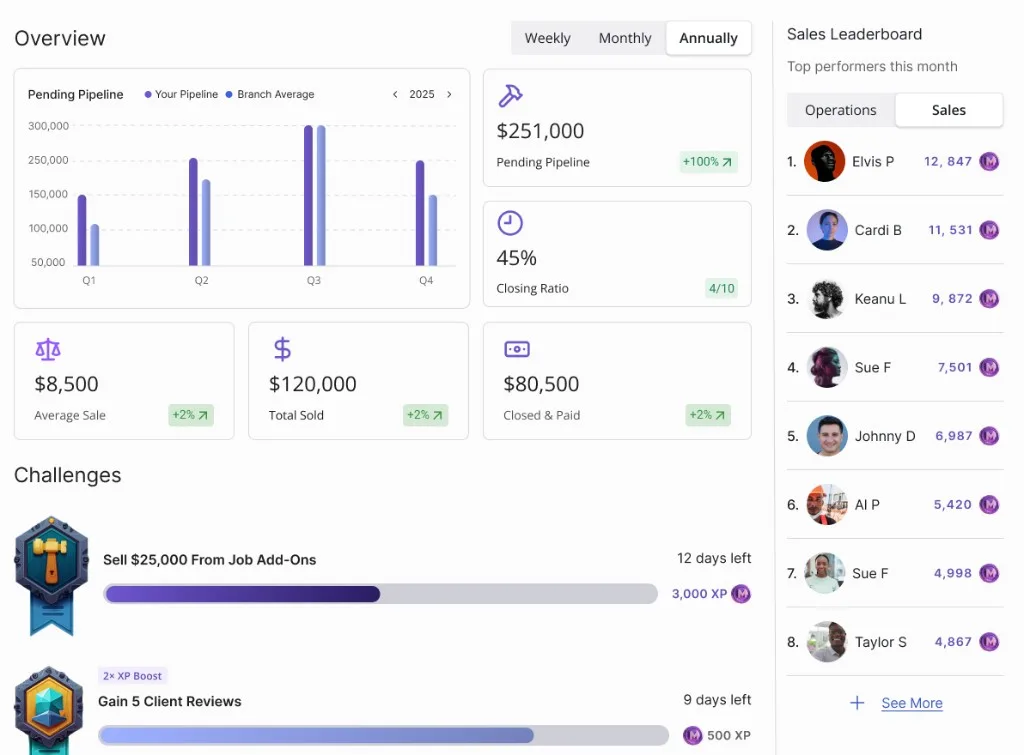
Two active Menaia challenges with badge artwork: Sell $25,000 from job add-ons, 12 days left at 3,000 XP, and Gain 5 client reviews with a 2x XP boost at 500 XP.
Meni is settling the job
Hours to bonuses, no arguments
  • Closed the job under budgetThe crew beat the time budget by 2.5 hoursClosed
  • Paid the bonus into the walletComputed from the hours, visible to the tech+$220.14
  • Posted the winLeaderboard and team feed updatedPosted

Everything else you'd expect, in one place.

Invoicing, payments, project forms, team feeds, and more. Book a demo and we'll walk you through every feature live.

Plans from $134.99 a month. Live in a week. No long-term contract.

Menaia runs on simple terms for HVAC businesses: clear plans with seats included, extra users at $35 a month, hands-on onboarding, and no long-term contract. We grow when you grow, so we would rather get you winning first.

The old way
  • Call for pricing, then a quote that changes on the demo
  • $10k+ onboarding and long implementation
  • Locked into a multi-year contract
  • Every new feature is a paid add-on
Menaia
The Menaia way
  • Plans from $134.99/mo with 3 seats included
  • Live and set in a week with hands-on onboarding
  • No long-term contract, stay because it works
  • Clear from day one, no surprise costs

From the crews already running Menaia.

A short customer story and a few words from the Attic Projects team on what changed after the switch.

Customer story"My closing ratio is now no less than 50%" — Eben Woodall, Attic Projects

"Before Menaia, I was able to manage 3 to 4 crews a day. Now I can run anywhere between 10 to 12 in 2 different locations."

Luis Guerra, Operations Manager
Attic Projects

"Payroll used to take me all day long, and now I can be done with my times in about 15 minutes in a day."

Brandon Jones, Office Administrator
Attic Projects

Questions from an HVAC office

Will Menaia choose or size the replacement system?

Your advisor specifies the equipment and scope. The estimating workflow uses the items, quantities, costs and labor allowances you supply through your catalog. Bring one of your own changeout estimates to see how that breakdown becomes a proposal.

Can maintenance visits sit beside replacement installs?

The calendar brings job shifts, sales appointments, tasks and time off together. Dispatch can review a maintenance visit against an install crew's availability before publishing assignments. The field team receives the published schedule.

What can I ask Meni after a busy week of installs?

Try “Which changeouts went over their labor estimate?” Meni reads the estimates and actual hours already in Menaia. For customer follow-up, ask it to draft a reply about an unsigned replacement proposal, then check the wording and approve the send yourself.

Where do startup photos and job hours go?

Photos stay in the project gallery, with folders you name for the way you work. Actual hours come from crew shifts on that job. The office can use the record to review the completed scope without collecting a separate set of messages from each installer.

How is a changeout bonus calculated?

Subtract actual labor hours from the estimate, multiply the hours saved by your branch base rate, then apply the pool percentage. Each crew member receives a share based on their hours on the install. Branch settings also control the payout cutoff.

Which plan covers the HVAC price book?

Core includes the price book and calculator at $199.99 a month for five seats and 6,000 tokens. Additional office or field users cost $35 per month each. Meni and phone activity use tokens; building estimates and scheduling installs do not. A 14-day trial includes 1,500 tokens.

What should our advisor bring to onboarding?

Bring your equipment catalog, installation labor allowances and an example of a changeout with ductwork. Guided onboarding helps set up the price book and get the crew onto the mobile app. Use that first job to check the handoff from proposal to field scope.

Bring a changeout your office quoted this week.

Walk through the equipment lines, labor budget, install handoff and invoice with us. See whether the advisor, dispatcher and installer can each find what they need.

  • One connected flow from lead to project to performance
  • Live and set in a week with guided onboarding
  • Clear plans, extra users just $35/mo
  • Goals, bonuses, and leaderboards crews can see in real time
Loading available times…

Select a time to continue